


GPS Speedometer - Odometer App
4.03.62K Reviews
App Specs
- Version
- 2.9.1
- Updated On
- License
- Free
- Downloads
- 10,000,000+
- Developer
- Tech 4 All Apps
- Categories
- Maps & Navigation
- Platform
- Android
Screenshots
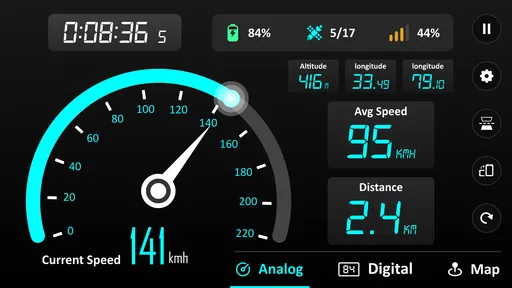
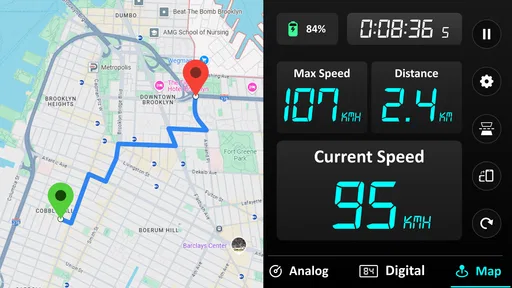
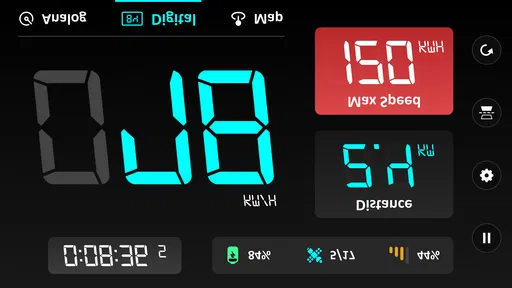
 Analysis by AppCompare
I find a GPS speed display most useful when a vehicle’s built-in readout is hard to see, or when I want a simple record of how far a trip took me. GPS Speedometer - Odometer App is aimed at that practical gap: it uses a phone’s location signal to show speed and distance, rather than trying to replace a full navigation system. That distinction matters. I’d reach for it to check a bike ride or compare a commute, but I wouldn’t treat it as turn-by-turn guidance or as a substitute for a vehicle’s safety equipment.
Before setting off: choose the right job for the app
The app is a free Maps & Navigation tool from Tech 4 All Apps. It has a 4.0 average from around 202,000 ratings, with over 10 million installs, and is marked suitable for everyone. Version 2.7.10 requires Android 6.0 or later; the app also has in-app purchases, ranging from $1.99 to $49.99 per item. Those details make it easy to try, though I’d check the purchase screen carefully before choosing anything beyond the free use.
Its best role is a quick instrument for a journey where speed or distance is the main question. A cyclist might want a large speed readout without opening a route-planning app; a driver might use the odometer display to get a rough trip-distance comparison; a runner could check pace-related movement at a glance, while remembering that this is speed and distance tracking rather than a dedicated training log. If my priority were route directions, traffic avoidance, or detailed workout analysis, I’d choose an app built around those jobs instead.
Set up a useful check, not a distraction
Before moving, I’d open the app while stationary, check that the location signal has settled, and select the distance units that make sense for the trip. That small pause is more valuable than staring at the screen once underway. GPS readings can take a moment to stabilize, especially when the phone has just been opened or the surroundings make reception less dependable. I would treat the first few seconds as warm-up rather than as a precise measurement.
For a car, the windshield reflection option can make the figures easier to glance at when the phone is positioned safely. I’d test the angle while parked: a reflection that looks clear in daylight may be less comfortable at another time or from a different seat position. The phone should never be adjusted while driving, and a projected-looking readout does not remove the need to keep attention on the road. On a bicycle or while walking, I’d secure the phone before starting and avoid checking it in situations where handling it would be unsafe.
Follow the trip from start to finish
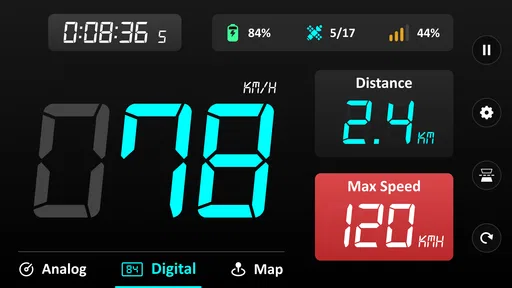
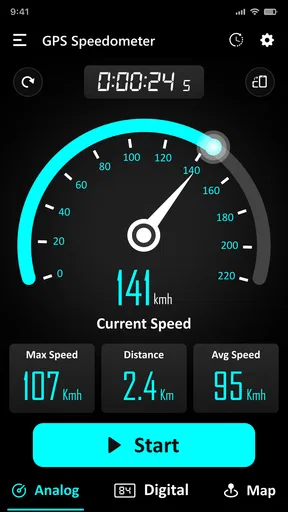
Once moving, the large speed figure is the most immediately useful part. It answers a narrow question quickly, without the map clutter that can come with navigation apps. The distance counter adds a second kind of context: instead of remembering how far a route felt, I can compare the displayed total with a familiar journey or use it as a simple record of an outing. Switching between miles and kilometers also helps when a route, sign, or personal log uses a different system.
For a realistic commute, I’d start the app before leaving, note the odometer at the beginning, and check it again only after parking. That gives me a straightforward trip distance without turning the ride into a screen-watching exercise. If I’m comparing two routes, I’d repeat the same start-and-stop habit on each one and keep the conditions roughly similar. Traffic, detours, and small differences in where I begin or end can affect the comparison, so I’d use the result as a practical estimate rather than a laboratory measurement.
Worth Reading Before You Choose

EA SPORTS FC Mobile 26 Is a Bigger Football Game, but It Takes Time

Flipboard Shows What News Apps Must Do Beyond the Feed

Switching to Android Auto Means Rethinking Your Driving Routine

Google Calendar Makes a Crowded Week Easier to Manage

Ludo King Makes the Most of the Minutes Between Plans

Baby Panda World Brings Quick Play to Modern Phones, but Its Game Library Feels Busy
There is also a useful handoff between this app and whatever I normally use to plan a trip. I can use a maps app for directions, then open this speedometer when I want a more prominent speed or distance display. That keeps each tool focused on its stronger task, but it does mean switching apps and planning the change while stopped. It isn’t a replacement for a navigation screen that combines route guidance and speed in one place.
What the reading can—and cannot—tell you
GPS-based speed is most meaningful when the phone has a clear, steady location signal and the journey is underway. In a tunnel, between tall buildings, under dense cover, or during frequent stops, the display may lag or fluctuate. A speedometer app also depends on the phone being carried and positioned sensibly; a loose phone, an obstructed view of the sky, or an interrupted session can make the experience less dependable. I would not use one reading to settle a disagreement about a vehicle’s calibrated speed or to make a safety-critical decision.
Battery use deserves a little planning too. The original impression is that consumption is efficient, but any long session relying on GPS can still use more power than leaving the phone idle. For a longer drive or ride, I’d begin with a well-charged phone and avoid running other demanding apps unnecessarily. If the phone is already low, the car’s own display or a basic mechanical cycle computer may be the more sensible choice.
Getting Started with the App
First off, downloading and setting up the GPS Speedometer - Odometer app is a breeze. It's available for both Android and iOS, and you can find it easily with a quick search. Once installed, the app greets you with a clean and intuitive interface. No fuss, no clutter—just straight to business. The main screen displays your current speed in large, easy-to-read numbers, which is perfect when you’re on the move.
Features That Stand Out
What really caught my attention were the diverse features packed into this app. Let’s break them down:
- Real-time Speed Tracking: This is the heart of the app. It uses GPS to provide accurate speed readings. Whether you’re cruising on a highway or cycling through a park, the app delivers precise data.
- Odometer Functionality: Not only does it track speed, but it also logs your total distance traveled. This is super handy for tracking your daily commutes or long road trips.
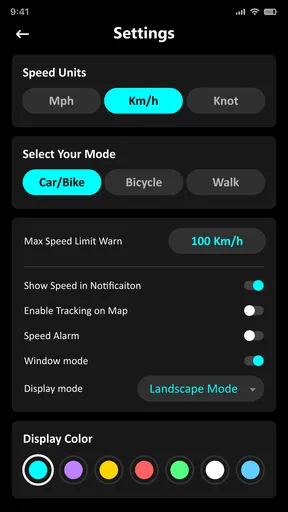
- Customizable Units: You can switch between kilometers and miles, which is great if you’re traveling internationally and need to adapt to different measurement systems.
One of the coolest things is the HUD mode. It mirrors the display on your windshield when you place your phone on your car dashboard. It’s like having a futuristic car without the hefty price tag!
Performance and Usability
In terms of performance, the app runs smoothly without any noticeable lag. I tested it on different terrains and speeds, and it consistently delivered reliable data. The battery consumption is quite efficient, which is a relief because we all know how GPS can sometimes be a battery hog.
The usability factor is high. The app is designed with the user in mind, making it accessible for tech-savvy individuals and beginners alike. Everything is just a tap away, and the settings menu is straightforward and easy to navigate.
Why You Should Try It
If you’re someone who loves to keep track of your speed and distance, or if you’re a data nerd like me who loves statistics, this app is definitely worth a download. It’s not just for drivers; cyclists, runners, and even skaters can benefit from its features. Plus, it’s a great tool for those who want to ensure they’re driving at safe speeds.
Another aspect I appreciate is the app’s compatibility with different devices. Whether you’re on an older smartphone or the latest model, the app adapts beautifully, ensuring everyone gets the same seamless experience.
GPS Speedometer - Odometer is more than just a speed tracker; it's a versatile tool that adds value to your daily travels. So, if you’re looking to keep tabs on your speed and distance, give this app a try. It might just become your new favorite travel companion.
Happy traveling, and keep those wheels spinning safely!
Pros
- Accurate real-time speed tracking.
- User-friendly interface design.
- Customizable display options.
- Works offline without data usage.
- Includes trip history and statistics.
Cons
- May drain battery quickly.
- Ads can be intrusive.
- Limited features in free version.
- Occasional GPS signal issues.
- Not compatible with all devices.
FAQs for GPS Speedometer - Odometer App
What features does the GPS Speedometer - Odometer App offer?
The GPS Speedometer - Odometer App provides real-time speed tracking, odometer functionality, and trip logging. It displays speed in various units such as mph, km/h, and knots, and offers a heads-up display (HUD) mode for safer driving at night. The app also includes features like speed alerts, average speed calculations, and a compass for navigation.
Is the GPS Speedometer - Odometer App accurate compared to a vehicle's speedometer?
The app uses GPS data to calculate speed, which can sometimes be more accurate than a vehicle's speedometer, especially in older vehicles. However, accuracy can vary based on GPS signal strength and environmental conditions. It's advisable to use it as a supplementary tool rather than a replacement for your vehicle's speedometer.
Does the app work without an internet connection?
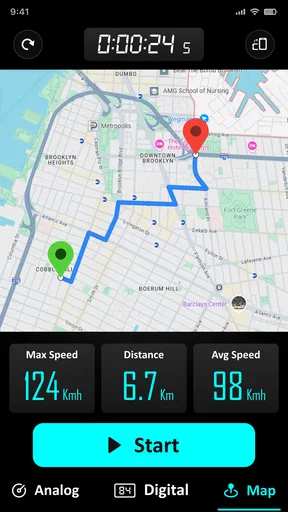
Yes, the GPS Speedometer - Odometer App can function without an internet connection, as it relies on GPS satellites to determine speed and distance. However, some features like map integration or online backups may require internet access to function fully. Ensure your device’s GPS setting is enabled for optimal performance.
What are the pros and cons of using this app?
Pros include easy-to-read displays, customizable settings, and multiple unit options. It’s user-friendly and enhances driving safety with features like speed alerts. Cons might be occasional inaccuracies in poor GPS conditions and battery drain due to continuous GPS usage. It’s recommended to keep the device charged during use.
Is the app compatible with all devices and operating systems?
The GPS Speedometer - Odometer App is designed to work on most Android and iOS devices. However, it's important to check the app's compatibility with your device's specific model and OS version in the app store. Regular updates ensure improved compatibility and feature enhancements over time.


